Affiliate disclosure : This article contains affiliate links. if you purchase through these links, I may earn a small commission at no extra cost to you. As an amazon associate, I earn from qualifying purchases. Thank you for your support.
In today’s digital lifestyle, managing multiple electronic devices efficiently has become a necessity rather than a luxury. From smartphones and laptops to printers, lamps, and smart home accessories, modern spaces demand a reliable and organized power solution. The AOFO Tower Power Strip with Flat Plug is designed to meet this growing need by combining high-capacity power distribution, USB charging, and advanced safety protection in a compact vertical design.
This review explores the design, functionality, safety features, and practical use cases of this multi-outlet charging tower to help users determine whether it fits their home, office, or dorm setup.
Overview of the AOFO Tower Power Strip
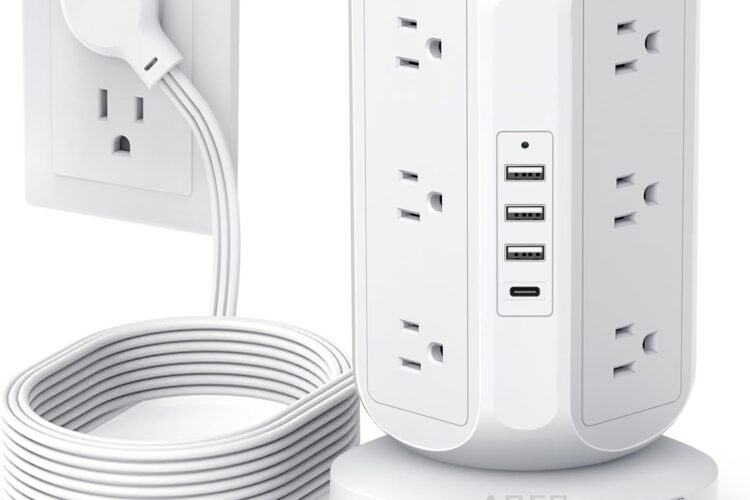
The AOFO power strip stands out from traditional horizontal strips by using a vertical tower structure, allowing more outlets in less surface space. It features:
- 12 AC outlets
- 4 USB charging ports (including 1 USB-C)
- 10-foot heavy-duty extension cord
- Flat plug design
- Built-in surge and overload protection
This configuration makes it suitable for environments where several devices must be powered simultaneously without clutter or tangled cables.
Vertical Tower Design: Space-Saving and Organized
One of the most notable aspects of this power strip is its tower-style layout. Unlike flat power bars where bulky adapters can block adjacent sockets, the vertical spacing allows larger plugs to be used without interference.
Benefits of the tower design:
- Reduces cable congestion
- Keeps workspaces visually clean
- Allows easy access to outlets from all sides
- Ideal for desks, nightstands, and shared spaces
The widely spaced outlets are particularly useful for chargers, adapters, and power bricks commonly used with laptops and monitors.
12 AC Outlets for Multi-Device Environments
With 12 AC outlets, this power strip supports high-density device setups such as:
- Desktop computers
- Monitors
- Printers
- Lamps
- Routers and modems
- Gaming consoles
- Small home appliances
This makes it especially suitable for:
- Home offices
- Student dorm rooms
- Shared apartments
- Workstations with multiple electronics
Instead of using several power bars, one centralized unit can simplify power management.
USB Charging Ports Including USB-C
In addition to AC outlets, the AOFO tower includes 4 USB ports, consisting of:
- 3 standard USB-A ports
- 1 USB-C port
This allows direct charging of compatible devices without needing bulky wall adapters.
USB charging is ideal for:
- Smartphones
- Tablets
- Wireless earbuds
- Bluetooth accessories
- Smartwatches (via USB cable)
The inclusion of USB-C makes the power strip more future-ready, supporting newer devices that increasingly rely on Type-C connections.
Flat Plug & 10-Foot Extension Cord
Flat Plug Advantage
The low-profile flat plug is designed to sit close to the wall, making it ideal for tight spaces such as:
- Behind furniture
- Beds
- Desks
- Bookshelves
This helps maintain a clean layout while preventing unnecessary bending or pressure on the plug.
Extra-Long 10Ft Power Cord
The 10-foot extension cord adds flexibility when wall outlets are not conveniently located. It allows better placement of the charging station without rearranging furniture or relying on additional extensions.
Built-In Surge and Overload Protection
Electrical safety is a critical factor in any power solution. This power strip includes integrated surge protection and overload protection, helping safeguard connected devices from:
- Power surges
- Voltage fluctuations
- Electrical overload
When the system detects excessive current, it automatically cuts power to reduce risk to connected electronics.
This makes the unit suitable for powering sensitive devices such as computers, routers, and entertainment equipment.
Suitable for Multiple Environments
Thanks to its versatility, the AOFO Tower Power Strip works well in many settings:
Home Use
- Living rooms
- Bedrooms
- Entertainment centers
- Smart home hubs
Office Use
- Workstations
- Conference tables
- Printer and networking areas
Dorm Rooms
- Limited outlet spaces
- Compact desks
- Shared charging needs
Its vertical structure and multiple charging options make it particularly practical in small or shared spaces.
Build Quality and Practical Design
The power strip is designed with stability in mind, featuring a solid base to prevent tipping when multiple cables are connected. The materials are built for daily use, and the clean, modern design blends easily with most interiors.
Additional design highlights:
- Organized outlet layout
- Clear separation between AC and USB ports
- Easy plug-in access from all sides
Who Is This Power Strip Best For?
The AOFO Tower Power Strip is ideal for:
- Users with many electronic devices
- Remote workers and home office setups
- Students in dormitories
- Families sharing charging stations
- Anyone seeking better cable organization
It is particularly beneficial for people who want a single centralized charging solution rather than multiple wall adapters and extension cords.
Final Thoughts
The AOFO Tower Power Strip with 12 outlets and USB charging ports offers a practical and modern solution for powering multiple devices safely and efficiently. With its space-saving vertical design, flat plug, long extension cord, and built-in protection features, it addresses many of the common challenges found in traditional power strips.
For homes, offices, and dorm rooms where device management matters, this charging tower provides a balanced combination of capacity, convenience, and safety—making it a strong option for everyday power organization.
VIEW ON AMAZON
If the button doesn’t work, please refresh the page.